
The Silent Brain: Why Your VR Arcade Can’t Live Without the SynthesisVR Proxy
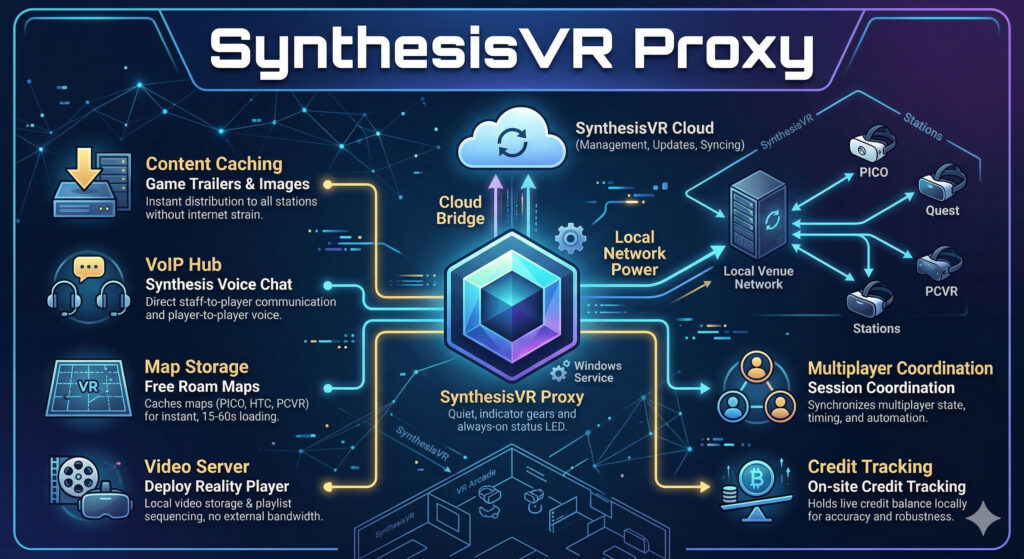
Every successful VR venue has a “silent operator” working behind the scenes. It doesn’t have a flashy UI, and most of your staff will never even click its icon, yet it is the single most important factor in your daily uptime. We are talking about the SynthesisVR Proxy: the local “brain” that bridges the gap between cloud-based management and your on-site hardware. While many operators spend weeks debating the upfront costs of Meta Quest vs. PICO 4 Ultra Enterprise, the reality is that your choice of local infrastructure is what actually dictates your long-term margins. Whether you are running a high-throughput Free Roam arena or a standard arcade, the Proxy is what ensures your maps load in seconds and your sessions stay synced even if the internet fails. What is an edge-cloud service and why does it matter? SynthesisVR is built on what is called an edge-cloud architecture. In plain terms: your venue keeps its own local copy of the data it needs to run (that is the “edge” part), while staying connected to the cloud for management, updates, and syncing. The proxy is what makes this possible. It sits on one computer at your venue, a Windows PC, running silently as a background service and acts as the bridge between SynthesisVR’s cloud infrastructure and everything running on your local network. When this design was first built into SynthesisVR, edge-cloud was considered an unusual approach. Today it is widely regarded as best practice, precisely because it solves a problem every venue operator eventually faces: what happens when the internet connection drops, slows down, or becomes unreliable mid-session. With the proxy handling local communication, your venue keeps running. What the proxy is actually doing right now Most operators assume the proxy just handles basic connectivity. Here is what it is actually doing at your venue. Content delivery, without touching your internet Every time a new game trailer or image is added to the SynthesisVR platform, your stations do not download it directly from the internet. The proxy fetches and caches that data locally first. Then each station pulls it from the proxy. This means a new trailer gets distributed to every station on your network almost instantly, without each station making its own external download request. Faster, cleaner, and easier on your connection. A built-in voice communication hub The proxy includes a built-in VoIP central (Voice over IP, the same technology behind apps like WhatsApp calls). This powers the Synthesis Voice Chat app, which lets all players in a session talk to each other regardless of which game they are playing. More usefully for operators: it also lets staff talk directly to players mid-session, even when the game itself has no voice support. If a player needs help, you can reach them without interrupting the experience. Free roam map storage, loaded in seconds For free roam setups using PICO, HTC Focus, or PCVR, the proxy caches all arena map data locally. Switching maps takes between 15 and 60 seconds. Without local caching, the same process depends entirely on your internet speed and can take several minutes. For a venue running back-to-back sessions, that difference adds up quickly. Video Vault and playlist sequencing The proxy also functions as a video server for venues using the Deploy Reality Player. Videos can be uploaded through Local Manager and stored on the proxy, then distributed to headsets without any external download. These videos can be arranged into playlists, so a 15-minute experience made up of three different videos plays through automatically, with no manual intervention between clips. A Santa’s Sleigh Ride or a multi-chapter tour experience runs itself. Session coordination for multiplayer games When a Synthesis-optimised game launches across multiple stations, those stations need to agree on timing, state, and automation. All of that coordination data flows through the proxy. It acts as the central hub for that communication, keeping every station in sync throughout the session. The Proxy handles the heavy lifting of multiplayer timing so you don’t have to. Ready to see it in action? Explore our library of Synthesis-optimized multiplayer games to find your next big hit. Credit tracking, on-site and accurate For venues on credit-based subscriptions, the proxy holds the live credit balance locally. When a session starts, the station tells the proxy how many credits to reserve. When the session closes, the final charge is confirmed and the balance updates. If something interrupts that process, a power cut, a SteamVR crash, the proxy and cloud may temporarily show different numbers. A manual sync option in Local Manager resolves this instantly, and the proxy auto-syncs with the cloud every 30 to 60 minutes regardless. The setup mistakes worth knowing about The proxy works best when it is set up correctly from the start. A few things that catch operators out: The proxy and stations must be on the same network. If your venue has multiple subnets, say, different floors each with their own network, stations on a different subnet cannot reach the proxy. The fix is to install the proxy on a PC connected to the main network switch, so everything on-site can reach it from one place. WiFi is fine for small setups, Ethernet is better for larger ones. The proxy does not move large amounts of data, but it does handle constant communication between stations. For venues with up to four or five stations, a WiFi-connected PC is usually fine. For larger setups, a wired Ethernet connection removes any risk of network latency affecting the session experience. One proxy per venue. SynthesisVR now checks for an existing proxy before allowing a new installation, so duplicate installs are rare, but worth knowing. One location, one proxy. The most common issue is a Windows account conflict. When the proxy installs, it creates a background Windows service account. If third-party software on the same machine interferes with that account, the proxy stops working. The most common cause is documented in the SynthesisVR knowledge base with a straightforward fix. Checking your proxy
Local Manager Part 2: The Features Most Operators Discover Too Late
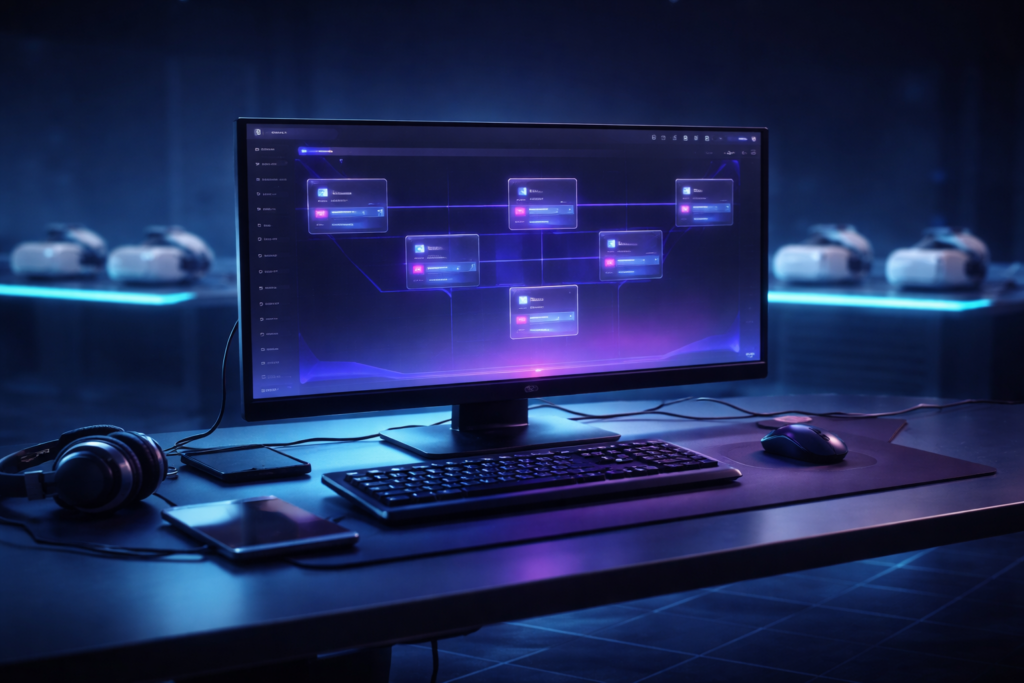
Last week covered the operational backbone of SynthesisVR Local Manager and how it unifies PCVR and standalone VR arcade management into a single interface. If you missed it, start here first: https://synthesisvr.com/vr-arcade-management-software/ Most operators establish Local Manager, acquire the fundamental knowledge, and proceed. However, beneath the surface lie features that directly impact session quality, VR headset fleet management, and daily throughput in location-based entertainment VR venues. These features only become apparent when issues arise or when support tickets accumulate in our inbox for the third time within a month. This article delves into the most frequently overlooked aspects. The Zzz Icon: The Small Symbol That Kills Sessions Picture this. A group is ready, your staff hits Launch, and nothing happens. The headset is on, the game is licensed, everything looks fine. The culprit is a small icon in the top right corner of the station screen that most operators have never noticed. The Zzz symbol means the headset is in sleep mode. It is not being worn, or it has gone idle. Launch a session against a sleeping headset and the game either fails silently or starts in a state the guest cannot recover from without staff intervention. The fix is simple once you know it exists. Before every launch, check the station row for the Zzz indicator. If it is showing, wake the headset first. Ten seconds of awareness before launch saves a ruined session and an awkward conversation with a group who just sat down. In a busy LBE VR operation running back-to-back sessions, this single check is worth adding to your staff pre-launch routine today. It costs nothing and protects VR arcade throughput during peak hours. The Gear Icon: The Setting in Plain Sight Click the gear on any title inside Local Manager and you get access to a panel that controls the full lifecycle of that game across your connected VR headset fleet. Info, Update, Install, Uninstall, all from one place, across all your headsets simultaneously. When a game crashes unexpectedly or throws an error on launch, Verify Game Files is one of your first stops. It checks the integrity of the install across your connected headsets and resolves the majority of content issues in minutes, without needing to contact support. The Install tab shows every station where the game can be added. The Uninstall tab shows where it currently lives and lets you remove it selectively. If you are adding a new headset to your fleet or recovering a device after a reset, this is how you get it back in sync without touching each unit individually. For standalone VR arcade environments managing mixed hardware across multiple stations, this panel is the fastest way to keep your fleet consistent. You can also configure VR controller behaviour per game from here, customising how controllers respond within a specific title. Worth exploring for games where the default setup does not feel quite right for your guests. Note that certain tabs only appear if the game supports those options, so do not be alarmed if a tab is missing for a particular title. Quick View: Your Eyes on Any Station Without Leaving the Desk One of the most underappreciated tools in Local Manager is Quick View. It gives operators a live look at any connected station directly through the Local Manager interface, without needing a full remote desktop session. Is the game running? Is the headset sitting on the menu screen? Is something frozen? Quick View answers those questions in seconds from the front desk. For location-based entertainment VR venues running multiple sessions simultaneously, fast station visibility is a direct contributor to VR arcade throughput. It is not designed to replace dedicated remote desktop tools like RustDesk for deep troubleshooting, but for the fast checks that happen dozens of times a day it is significantly quicker. It also works reliably over LAN, which makes it a practical fallback when an internet outage takes your remote desktop connection offline. In a live venue with guests waiting, that matters. Spectator View: See Exactly What Your Guests See Spectator View gives operators and staff a real-time window into active gameplay from a dedicated screen, without entering the arena or interrupting the session. It runs on a dedicated game server PC that operates separately from your VR gaming stations. From that screen, staff can monitor guest progress, observe gameplay, and adjust session parameters on the fly including game mode, map size, player names, headset calibration, and team management, all without touching a headset or stepping into the play area. The practical applications go beyond monitoring. Venues can display the live gameplay feed on an external screen for guests waiting outside the arena, which builds anticipation and drives walk-in bookings. For troubleshooting mid-session issues, Spectator View lets you see exactly what the guest sees before deciding whether to intervene. One operational detail worth knowing: the game server PC running Spectator View carries no commercial usage billing. It exists purely to manage and observe sessions, which means the cost of running it does not compound against your commercial VR content licensing usage. Spectator View is available through the Standalone Game Server module. For free roam VR management environments running premium multiplayer titles that require a dedicated server instance, this module covers both needs from a single setup. Steam in a Commercial Venue: What Operators Get Wrong Steam personal accounts and commercial VR operations do not mix, and the confusion around this costs operators time, licensing headaches, and occasionally failed sessions at the worst possible moment. Each VR station requires its own dedicated Steam account. A personal account cannot be shared across multiple stations simultaneously. Running a personal Steam library on commercial hardware is a terms of service violation and creates unpredictable behaviour when Steam pushes updates or prompts account verification mid-session. For commercial content, SynthesisVR uses a Pay-Per-Minute licensing model that operates independently of Steam entirely. Games are delivered through the SynthesisVR CDN, a dedicated content delivery network that distributes commercially licensed VR
The Operational System Behind Reliable VR Attractions
SynthesisVR was originally born from one of the very first VR arcades in the world by operators who experienced firsthand the complexity of running daily sessions, staffing, and hardware coordination once the venue opened to the public in 2016 under VR Territory in Los Angeles. The objective was to coordinate hardware and VR devices, simplify commercial content licensing, and reduce the amount of staff intervention required to manage sessions. Since then, SynthesisVR has evolved into a complete VR management software and VR location management platform, capable of managing different types of VR attractions, from PCVR arcade installations to standalone and free roam VR environments. Local Manager is a desktop application installed on the operator computer that connects all stations and headsets into a single controlled system. As part of the broader Synthesis VR ecosystem, it functions as a core VR arcade management system and VR operator platform. Staff can confirm station readiness, launch or stop sessions, and view what is running on each device without physically interacting with equipment. The goal is simple: keep sessions starting on time and running smoothly even during peak hours. Managing PCVR and Standalone Together Many VR venues operate both PC-powered and standalone experiences. In practice this often requires more than one management platform, different preparation steps, different update processes, and different recovery procedures when something goes wrong. Staff training becomes more complex, and during busy periods mistakes happen. A wrong launch, an incomplete reset, or a missed update can delay the next group and slowly shift the schedule. Local Manager removes that separation. From the same interface, operators can launch sessions on one or multiple stations, monitor activity, update or install content, and prepare devices regardless of hardware type. The workflow remains consistent whether the attraction uses a PCVR arcade setup or a standalone VR arcade configuration. For staff this reduces training time and decision-making during operation. For the venue it keeps the schedule predictable and avoids small delays accumulating into lost sessions. These mixed environments became common as the VR industry moved from only PC installations to standalone VR management and free roam VR software formats, increasing flexibility while adding operational complexity. SynthesisVR was designed specifically to unify those environments under one LBVR management software platform. Central Control for VR Attractions During operating hours, staff repeat the same preparation cycle before every group: confirm stations are ready, launch the experience, monitor playtime, and reset devices for the next session. Local Manager provides a live operational panel showing every station in real time. As part of a complete VR attraction management system, operators can immediately see whether a station is ready, running a game, or offline, what application is active, and whether devices are properly connected. Readiness is confirmed from the desk before players enter the play area. From the same screen, staff can control the attraction remotely. They can launch a game on one or multiple stations simultaneously, start synchronized multiplayer sessions, stop running applications, restart PCs or headsets, and recover disconnected devices. Games can be prepared in advance so players enter directly into gameplay without navigating menus. This is especially important for VR escape room software, room scale VR arcade environments, and location-based entertainment VR experiences where throughput and time management directly impact revenue. Consistent transitions between groups allow operators to maintain planned session frequency throughout the day, directly affecting daily capacity, a key factor in any VR arcade business plan. Free-Roam Operation and LBE Mode Free roam VR experiences introduce additional operational requirements. Every headset must share the same physical alignment, boundaries must remain consistent between groups, and system behavior must stay predictable while players move in the arena. In many setups this preparation is repeated on each headset. When a boundary shifts, a device restarts, or a different staff member prepares the next group, the play space may no longer match perfectly. Operators then pause sessions and recalibrate before the next group enters. SynthesisVR LBE Mode centralizes this configuration. Through Local Manager, operators define the play area once and distribute the calibrated map and environment settings to all connected headsets. Identical commands can be applied to multiple devices at the same time, ensuring the arena behaves consistently across sessions. If a headset is restarted or replaced, it can rejoin the attraction using the same configuration instead of repeating setup. Consistent boundaries also reduce the need for staff correction inside the arena, especially with new players. The free roam VR attraction operates as one coordinated system across all devices, transforming what would otherwise require manual intervention into a structured free roam VR management workflow. For operators running room scale VR or large-scale LBE entertainment software environments, this level of control becomes essential. Business Management Beyond the Play Area While Local Manager handles live operation inside the venue, SynthesisVR also provides a web-based administration layer for owners and managers who need visibility beyond individual stations. The Admin Web Console brings together sessions, customers, reservations, and station activity into one interface accessible remotely through a browser. As part of a full VR venue management software and VR content licensing platform, it connects operational control with business oversight. From here operators configure how the business operates day to day, including experience types, pricing structure, availability, and booking workflows. The operational Web Console features are part of the advanced management layer of SynthesisVR, available through paid add-ons or subscription plans. These tools extend beyond launching sessions and focus on automation and structured workflows as the venue grows. Operators can run timed sessions monitored automatically by the system, adjust or extend gameplay during play, move players to another station if needed, and keep a complete session history for reference. Bookings, customer records, and usage activity remain organized under the same account rather than across separate systems. This separation follows how venues typically operate in practice. Local Manager runs the attraction on site. The Web Console manages planning, automation, and long-term business oversight, all within a unified LBE VR platform. As locations expand into more stations,